
Fool me once, shame on you.
Fool me twice, shame on me.
When the TeleMessage breach occurred in mid-2025, we all pointed our fingers. Companies told their employees to stop using Signal and WhatsApp, (forcing habits to change) because they lacked reliable mechanisms for immutable capture, retention, and supervisory review.
But one platform quietly avoided the same scrutiny. iMessage. After all, there hasn’t been a breach yet.
Why iMessage Escaped Scrutiny
iMessage was never designed for compliance. Messages can be edited and deleted. Storage limits apply. Backup settings are controlled by the user. It is designed for everyday use.
None of that is a direct flaw. Apple built a consumer messaging platform, and it works as intended.
Because Apple Messages does not provide native WORM storage, compliance teams turn to third-party vendors to archive business-related iMessages. That’s where the real problem begins and and where the same shape of risk that surfaced in TeleMessage is hiding in plain sight.
The Hidden Risk in iCloud-Based Archiving
Some widely used compliance platforms rely first on Apple’s own message storage before syncing messages into their WORM-compliant archive. During that window, messages live in a system that allows normal user actions. If a message is edited or deleted on the device before synchronization occurs, the version that exists in iCloud at the moment of retrieval is what gets captured and archived by those compliance solutions.
Apple’s own documentation makes this clear. For example, Apple states that when you turn on Messages in iCloud, your message history is kept up to date across all your devices and that deleting a message on one device removes it from all.
Obviously, messages must be present and accessible in iCloud when the compliance solution goes to collect them. What this means, though, is that the archive reflects what exists at the moment it synchronizes, not necessarily what was originally sent. This gap can lead to significant risks, with organizations potentially incurring high remediation costs and facing compliance failures.
If your archiving workflow relies on Apple Messages before records are written into immutable storage, several things have to go right:
-
Messages must still exist on the device.
-
They must not be edited or deleted before capture.
-
iCloud or device backups must be enabled and functioning. (a user can change this)
-
Storage limits must not be reached. (that pesky 10 GB)
-
The device must be connected to power, and on a lock screen.
-
Sync must occur before any of those conditions change.
When all these requirements are met, great! The solution works. When they are not, messages can be edited, deleted, or lost before they ever reach the archive, leaving gaps, not records. The archive reflects what existed at the moment of sync: notwhat was originally sent.
This should feel familiar. With TeleMessage, everything appeared to be working until the breach exposed how messages were actually being handled. So, yes. Fool me twice… you know the rest.
What Compliant Capture Actually Looks Like
At Comma, we want you to ensure that your “compliance” software actually is compliant - that it works regardless of how external systems operate.
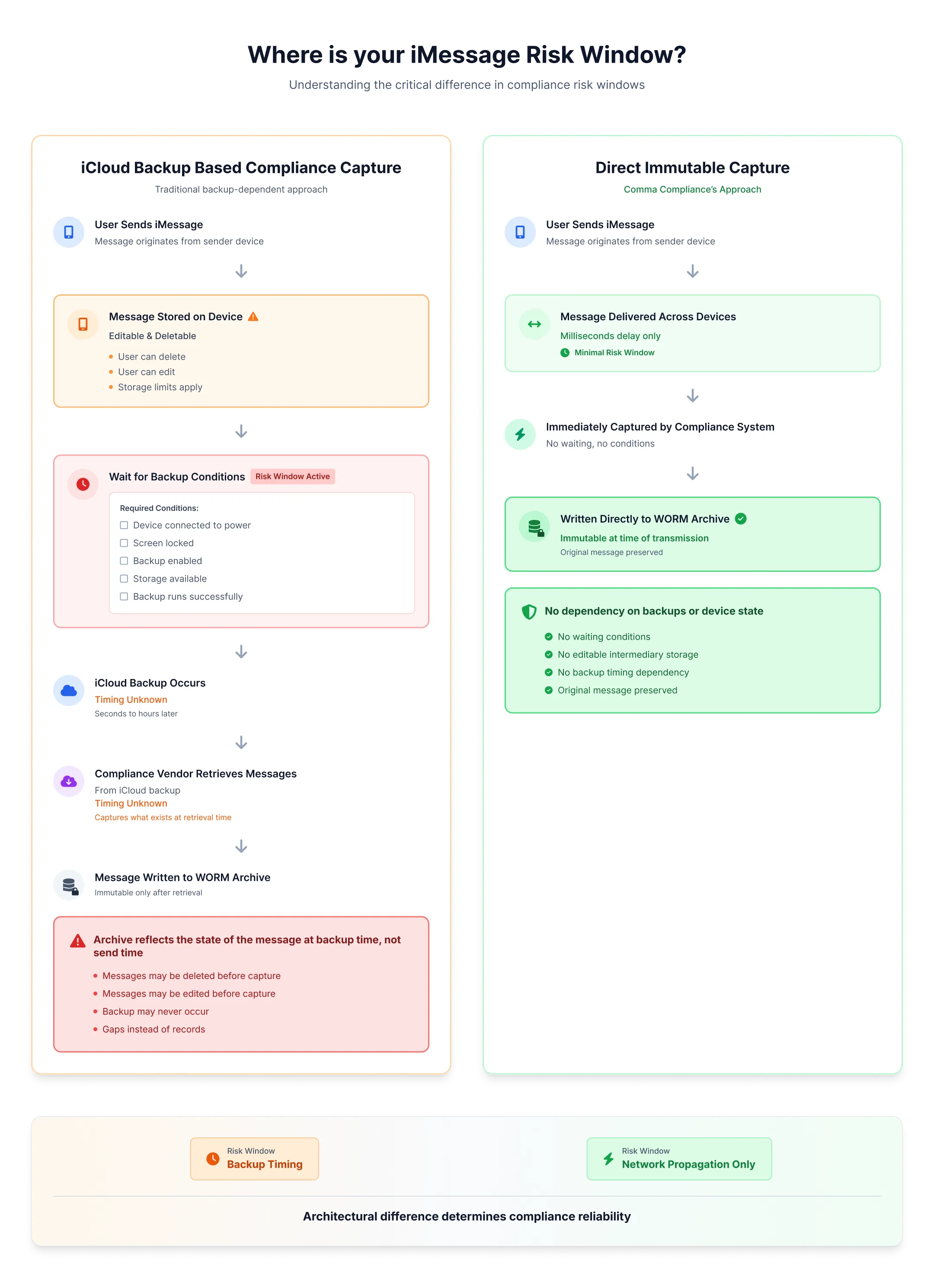
In iCloud backup-based approaches, the sequence is different. A message is first sent in iMessage. If iCloud Backup is enabled, storage limits have not been reached, the device is connected to power, and the screen is locked, Apple states that iMessages are backed up to iCloud as part of a daily backup. That backup may occur seconds, minutes, or hours after the message is sent.
Only after the backup runs does the compliance solution capture the message, pulling it from iCloud backup data. Vendors generally do not publish how frequently this capture process runs. In this model, the risk window is defined by backup timing, not by message delivery.
With Comma Compliance, the capture window is limited to message propagation between iMessage endpoints. Similar to receiving an iMessage on both a phone and a computer, there may be a brief delay measured in milliseconds. That delay? That’s the entire risk window.
The issue isn’t iCloud. The issue is using a mutable, consumer messaging store as an intermediary in a compliance-capture workflow
What to Ask Your Vendor
With TeleMessage, everything appeared to be working until the breach exposed how messages were actually being handled. The same dynamic applies here: an iCloud-dependent archiving workflow works when all the conditions are met, and silently fails when they aren’t.
Before trusting a compliance platform with iMessage archiving, ask one direct question:
Does your capture process rely on iCloud backups or Apple device storage at any point before messages are written to WORM storage?
If the answer is yes - or unclear - the architecture carries compliance risk regardless of what the interface looks like.
Apple storage does not need to be WORM-compliant. Your compliance vendor does. Period.
Comma Compliance captures iMessages at the point of delivery, not from iCloud.Get in touchto see how it works.
