
Already using Microsoft 365? So are most of your clients.
The moment an employee texts a client from a personal phone, that conversation never touches Microsoft 365, and no archive of it will exist unless something else captures it. The channels people actually use outside Outlook and Teams, like WhatsApp, Bloomberg Chat, iMessage, and others, don’t live inside Microsoft 365. Purview wasn’t built to capture them. Off-channel enforcement since 2021, over $3.2B across the SEC, FINRA, and the CFTC, has been almost entirely about communications outside the Microsoft stack.
When an examiner shows up, they don’t care which platform stored what. They want every message between Rep X and Client Y, across every channel, immutable, and produceable within hours. SEC Rule 17a-4 requires records to be non-rewritable, non-erasable, and produceable in that window. FINRA Rule 3110 requires written supervisory procedures to match the channels your team actually uses. WSPs that name Microsoft 365 but omit WhatsApp, Signal, or Slack are routinely cited.
Filling those gaps with a second archive means another vendor, another integration, another search interface, and another supervisory workflow your team has to run in parallel. Two archives means two exam exports. Cross-channel search becomes manual reconciliation, done under deadline pressure while an examiner is waiting.
Comma writes Microsoft 365 records to immutable WORM storage outside the tenant, and captures every non-Microsoft channel into the same archive. Search across every channel, produce records in one export, and close exam requests without stitching archives together.
How Comma Closes the Gap
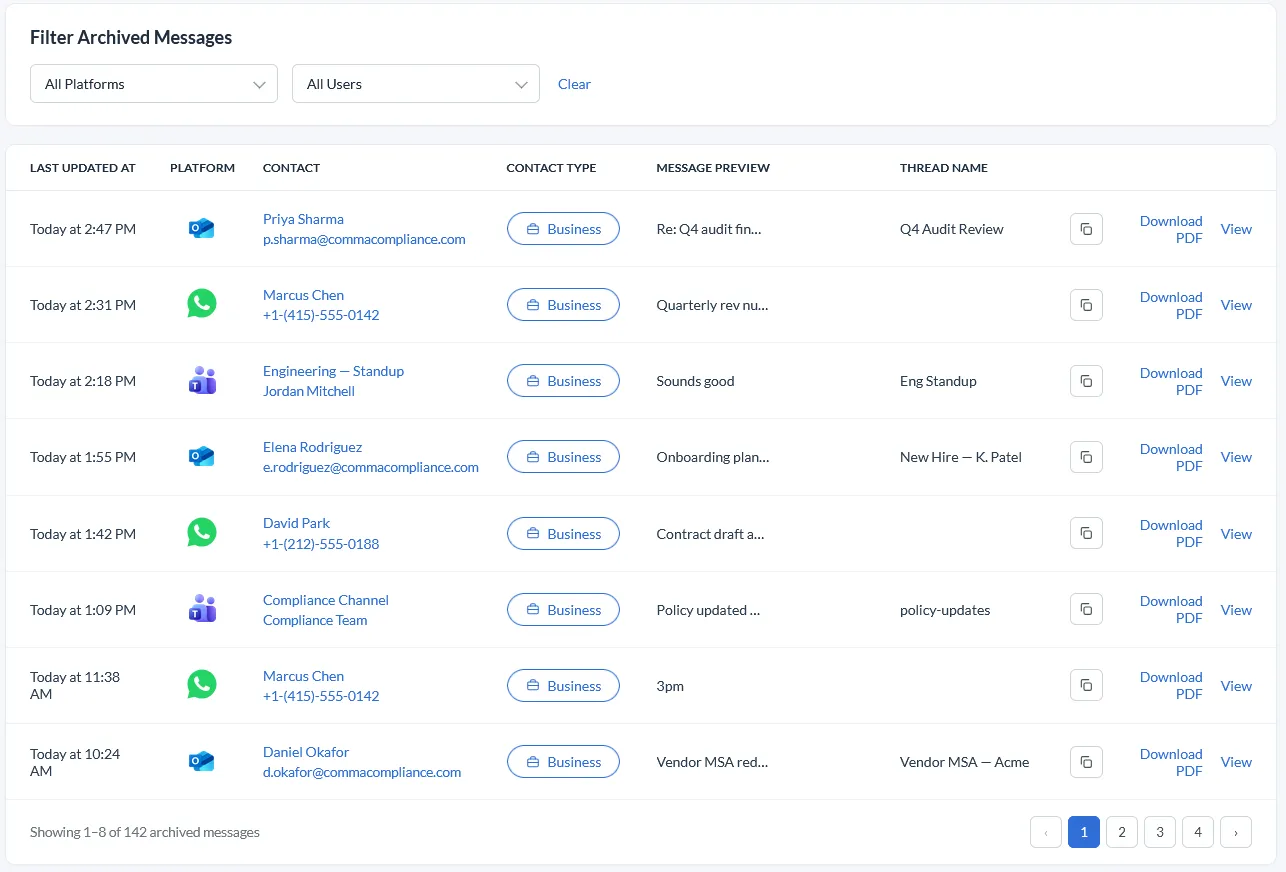
Comma captures Microsoft 365 alongside dozens of other channels into one immutable archive. One search interface, one supervisory review queue, one export. The Microsoft stack is covered. So is every channel your team uses that Microsoft doesn’t.
The whole Microsoft stack, captured in one connection
- Outlook / Exchange Online — every inbound, outbound, CC, BCC, and attachment
- Microsoft Teams — 1:1 and group chats, plus channel messages from any Team your monitored users have joined, with edits, deletions, reactions, and attachments
- SharePoint and OneDrive — files, version history, sharing permissions, external shares
- Calendar events, plus recordings and transcripts of meetings a monitored user organized
OAuth admin consent, no per-user setup
- A single Microsoft 365 admin authorizes Comma once for the entire tenant
- No individual users log in, install agents, or approve scopes separately
- Refresh tokens are stored securely and revocable from the Azure admin console at any time
External WORM archive, independent of Microsoft 365 configuration
- Records are written to immutable WORM storage outside Microsoft 365
- Independent of Microsoft 365 retention or hold configuration
- Designed against SEC Rule 17a-4 and FINRA Rule 4511
Unified with every other channel your team uses
- Microsoft 365 records sit alongside WhatsApp, Signal, iMessage, Bloomberg Chat, and 40+ other channels in one archive
- One search interface for examiners. One supervisory review queue. One exam-ready export workflow
- No Purview gap when employees text clients on personal devices
What this means for your team
For your compliance team
Email captured at delivery
Email is the first thing regulators ask for. Every message from Outlook and Exchange Online is written to the archive the moment it's received, not synced on a schedule, not dependent on a litigation hold being in place.
Outside-the-tenant immutability
Records are written to WORM storage Comma controls. Tenant admins cannot retroactively modify retention, alter classifications, or shorten holds on the archived copy.
Regulator-ready storage
Designed against SEC Rule 17a-4 and FINRA Rule 4511. Time-stamped, tamper-protected, with a complete audit trail of every record.
Cross-channel exam readiness
Examiners rarely ask only about email. With Comma, Microsoft 365 records and mobile messaging records are searchable, exportable, and exam-ready from the same interface.
For your IT team
One admin-consent flow
Tenant-wide authorization through OAuth with Microsoft Graph. No per-user enrollment, no MDM dependency, no client-side agents to deploy.
Least-privilege scopes
Comma requests only the Microsoft Graph scopes needed for the chosen access tier. Directory access alone, contact discovery, or full mail capture — granted per the documented permission tiers.
FAQ about Microsoft 365 Compliance Archiving
Does this replace Microsoft Purview?
Does Comma archive our Microsoft 365 email?
What Microsoft 365 licensing do we need?
How does this work alongside our existing Microsoft 365 retention?
Are Teams chat and OneDrive files included?
How quickly can we produce records for an SEC or FINRA exam?
Can we revoke Comma's access?
Microsoft 365 archiving built for your entire organization.
Capture Outlook, Teams, SharePoint, and OneDrive alongside WhatsApp, iMessage, and Signal in one unified archive. Multi-entity and multi-branch deployments supported.
Related reading
- Microsoft Purview AlternativeSide-by-side comparison of Comma and Microsoft Purview across architecture, retention immutability, channel coverage, and licensing.
- Microsoft 365 and Google OAuth PermissionsExactly what permissions Comma requests during Microsoft 365 authorization, why each one is needed, and what we never request.
- All 40+ channelsMicrosoft 365 is one of 40+ channels Comma archives into a single, exam-ready archive.