
Archive the meeting, not just the calendar entry.
Your meeting notetaker helps the team follow up. Comma brings its output into your business communications archive. Keep the transcript, the meeting context and the AI-written follow-up together, with a clear distinction between what was transcribed and what the model added.
Meeting notetakers
Fathom & Fireflies
Direct connections for available transcripts, meeting details and optional AI-written files and recordings. We enable Fathom and Fireflies for your team; your administrator then connects them. Otter Enterprise archiving is scoped separately on request.
Explore the recorder connectionsNative meeting platforms
Zoom, Teams & Google Meet
Retrieve the recordings and transcripts the meeting platform itself produces. What Comma can retrieve depends on your meeting platform permissions and recording settings.
Compare native captureKeep the transcript separate from the AI summary
A transcript and an AI summary serve different purposes. Comma uses the recorder’s transcript as the searchable meeting text and the input to policy checks. Available AI summaries and action items are separate attachments, marked as AI-generated and excluded from policy scanning.
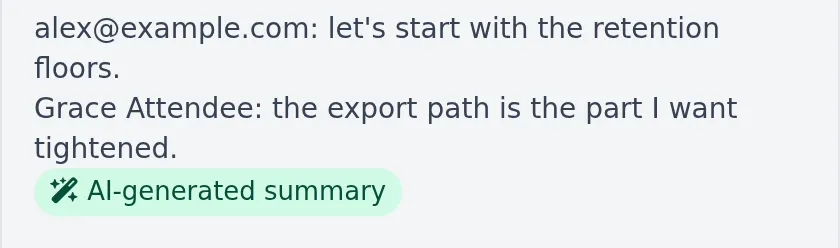
Comma displays the recorder’s transcript, with its AI-written summary clearly distinguishable.
During a client meeting, an adviser agrees to send an updated allocation. The transcript preserves the discussion as the notetaker transcribed it. The AI summary turns it into a follow-up task. Comma keeps both, without presenting the model’s wording as a quotation from the client.
Transcripts are also machine-generated and can contain errors. Where a recording is available and captured, you can check it against the text.
Fathom: bring the meeting and its follow-up
Connect Fathom once at the Comma team level using an API key. Comma retrieves accessible meeting transcripts and details, with optional summaries, action items and recordings. Fathom continues to handle the meeting recording and transcription.
- Transcripts and context: searchable meeting text, title, organizer, timing and participant information supplied by Fathom.
- AI-written files: summaries and action items are on by default and can be turned off by an administrator.
- Recordings: off by default. Turn on Meeting recordings if your firm needs the available media as well as the transcript. Downloads depend on Fathom making a recording available before its link expires.
- Access scope: the API key only gives access to meetings the key owner recorded or can already access.
Read the Fathom setup guide. If the connection is not visible in your team, request enablement.
Fireflies: connect the key, then set up delivery
Connect with a Fireflies API key, then add Comma’s delivery address in Fireflies Developer Settings. A webhook, the notification Fireflies sends when a transcript is ready, lets Comma retrieve the meeting. Save the same signing secret in both products so Comma can verify the notification.
- Transcripts and context: meeting text, title, organizer, timing and participant information available to the connected account.
- AI-written files: available summaries and action items are archived separately from the transcript, with the same administrator control as Fathom.
- Audio and video: optional and off by default. Availability depends on your Fireflies plan, recording settings and download access; video must have been enabled in Fireflies.
- Delivery setup: an API key alone does not complete webhook setup. Comma also runs periodic checks for accessible meetings, but you should finish the delivery steps and verify a test meeting.
Read the Fireflies setup guide. We confirm your plan, access scope and team enablement during setup.
Choose what Comma keeps.
These capture settings apply to the Fathom and Fireflies connections.
| Recorder content | Default | How you use it in Comma |
|---|---|---|
| Available transcript | Included | Search the meeting text and compare it against your configured policies. |
| Meeting details | Included | Identify the source, organizer, timing and available participant context. |
| AI summaries and action items | On | An administrator can turn these off. Download separately labeled attachments; their text is not policy-scanned or indexed as the meeting transcript. |
| Available recordings | Off | An administrator can turn these on to preserve accessible media alongside the text. Availability and download windows apply. |
Recorder meetings enter Comma as business records. This is a team-level connection, with access determined by the recorder account; it is not a per-employee personal-account setup or a promise that every meeting in the organization is visible.
Need Otter? We support Enterprise workspaces.
Keep using Otter and bring Comma into your recordkeeping workflow. Otter archiving is offered on request. Otter Enterprise is the plan that provides API access, so we scope this connection for Enterprise workspaces.
Tell us which workspace you use and whether you need transcripts, summaries, action items or recordings. We will confirm scope, setup timing and the historical date range with your administrator before you commit.
Request Otter archiving or read how to get started with Otter.
Keep your native meeting capture, too
Already recording directly in Zoom, Teams or Google Meet? Those connections retrieve the platform’s own available artifacts. A Fathom or Fireflies connection adds that recorder’s output through a separate capture path.
| Source | Capture scope | Deployment requirements |
|---|---|---|
| Zoom | Available cloud recording video, audio and transcripts. | Enable meeting capture and grant recording access. Local recordings are outside this cloud capture path. |
| Microsoft Teams | Available recordings and transcripts for meetings organized by monitored users. | Enable recording capture and grant the required permissions and content-download access. |
| Google Meet | Available meeting artifacts for eligible connected workspace users. | Workspace delegation, enabled capture and a Google edition that produces the required artifacts. |
If both a native platform and a recorder capture the same meeting, Comma currently shows them as separate records. A hold on one does not automatically apply to the other.
Zoom’s coverage view separates permissions, licenses and capture activity. Check for missing transcripts and recordings deleted at the source before retrieval when assessing coverage.
Connection is only the starting point
After connecting, record a short test meeting and check the transcript and the optional files you selected. On the recorder connection page, check Last meeting delivered, Last successful sweep and any open coverage gaps. An active API key does not mean every expected meeting has arrived.
Neither recorder connection can independently confirm that its webhook subscription remains configured at the provider. Check both delivery history and periodic retrieval results. Missing media, a source deletion or an access problem needs attention even when other meeting content has arrived.
Questions to settle before rollout
Does Comma send a new bot to the meeting?
Will it import our entire meeting history?
What about another notetaker?
Bring your administrator and a representative meeting to the walkthrough. We will review the source settings, the captured transcript, optional files and connection status together.
Browse platform integrations or explore CRM conversation sync.