
Improvement
The Configuration Center
Tenant settings used to be spread across the dashboard. They now live in one Configuration Center, grouped by what they control, so you can find a setting without hunting for it. Everything that shapes how your tenant runs is there, from capture and classification through retention, reporting, and billing.
Where to find it. Click Team in the top bar, then Configuration. Only admins can change configuration.
The Configuration Center opens on Overview, which shows tenant status, recent changes, and your tenant-wide preferences. The sidebar takes you to everything else.
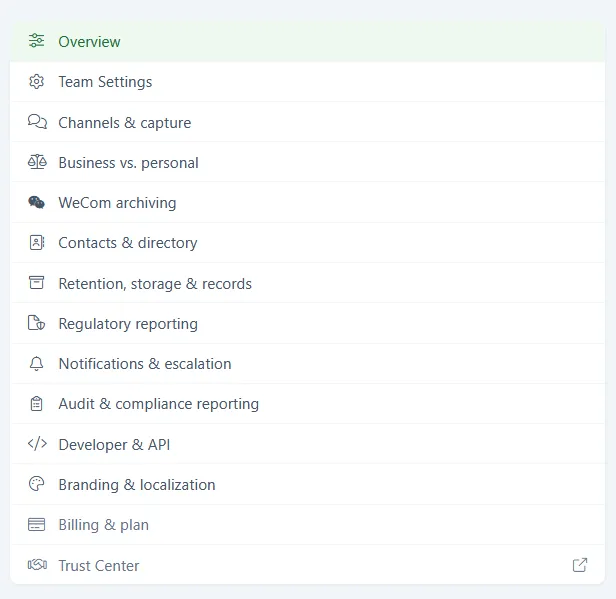
What each section controls:
- Team Settings - Manage team name, time zone, and primary language.
- Channels & capture - Which channels this tenant captures, and where to manage each one.
- Business vs. personal - Choose which platforms default contacts to business or personal.
- Contacts & directory - Control what admins and members can see in the contact directory.
- Retention, storage & records - Configure retention windows and outbound archive delivery to your own cloud storage (Amazon S3 or Azure Blob).
- Regulatory reporting - FINRA supervision, firm identity, registered reps, and the contact a filing carries.
- Notifications & escalation - Set up notifications and how alerts are escalated.
- Audit & compliance reporting - View the configuration change audit log and schedule regulatory reports.
- Developer & API - Manage API access and webhooks.
- Branding & localization - Customize branding and language for your tenant.
- Billing & plan - Manage your subscription and billing.
- Trust Center - Opens your public Trust Center in a new tab.
The Configuration Center overview in our docs walks through the same ground.
Learn more